Schedule your crew, send estimates and invoices, and get paid online, all from the BuilderBase app on your iPhone or Android. Built for local service businesses by someone right here in the community.
- Painting
- Plumbing
- HVAC
- Electrical
- Roofing
- Remodeling
- Handyman
- Landscaping
- Cleaning
Stay organized
Every job, client, and invoice lives in one spot. Stop digging through emails, texts, and sticky notes.
Actually easy to use
If you can text, you can run your business in BuilderBase. No training, no manuals, no IT department.
Talk to a real human
Got a question? Chris (the founder) will answer. Yes, that Chris. Usually the same day.
Take BuilderBase for a spin.
Answer 3 quick questions and we'll spin up a real project so you can poke around. Tasks, finances, schedule, the whole thing. No signup, no credit card, 30 seconds.
Job Complete!
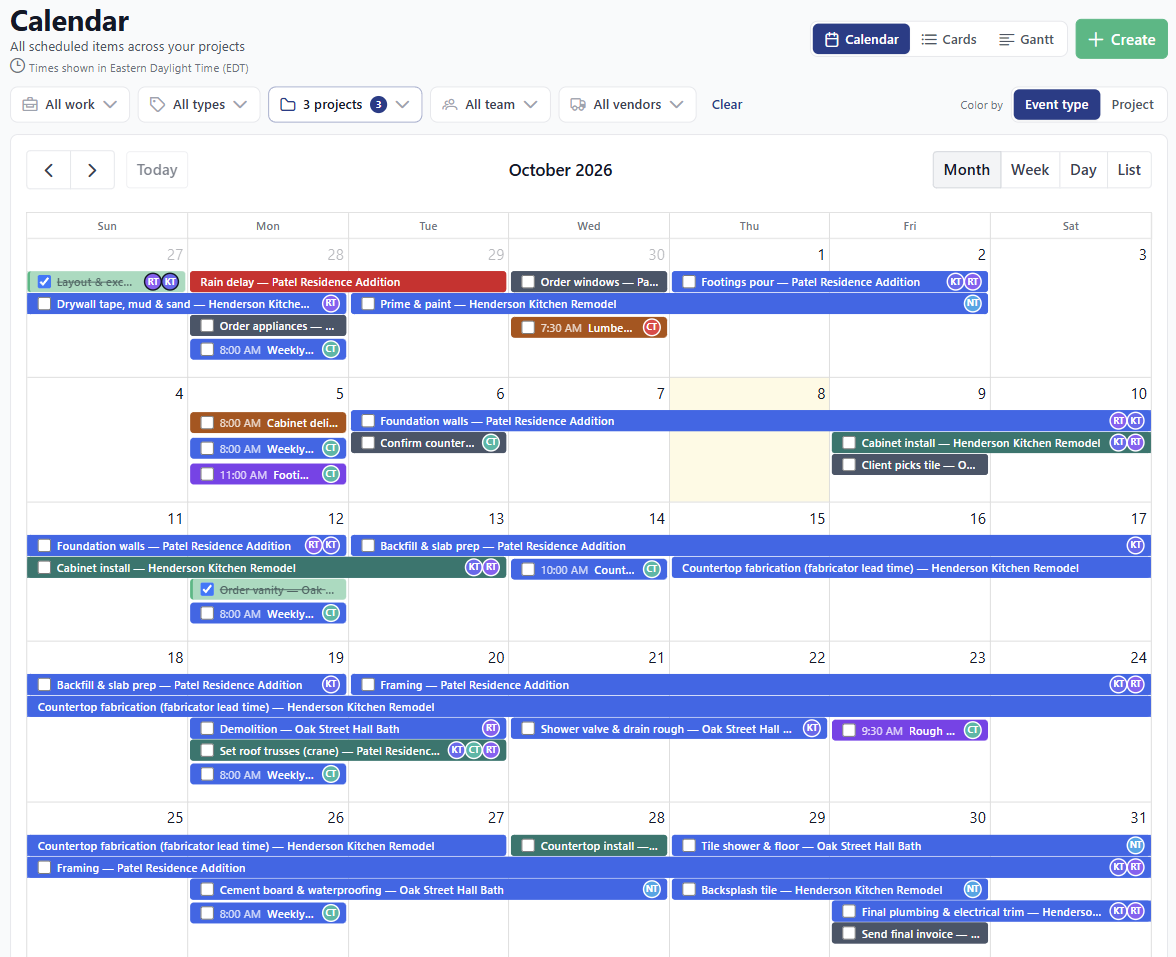
Run your whole day from one calendar.
Book the job, assign your crew, and their phones buzz with the details. On site, they start the job, add notes and photos, and close it out. You bill straight from the job when it's done.
- Drag and drop to reschedule. Month, week, day, list, or a Gantt timeline. You get a warning before you double-book someone.
- Your crew knows where to be. Everyone assigned gets a push notification and an email.
- Recurring jobs set up once. Weekly, monthly, whatever your route looks like.
- Fewer no-shows. Turn on visit reminders and clients get an email the day before. Syncs with Google Calendar, too.
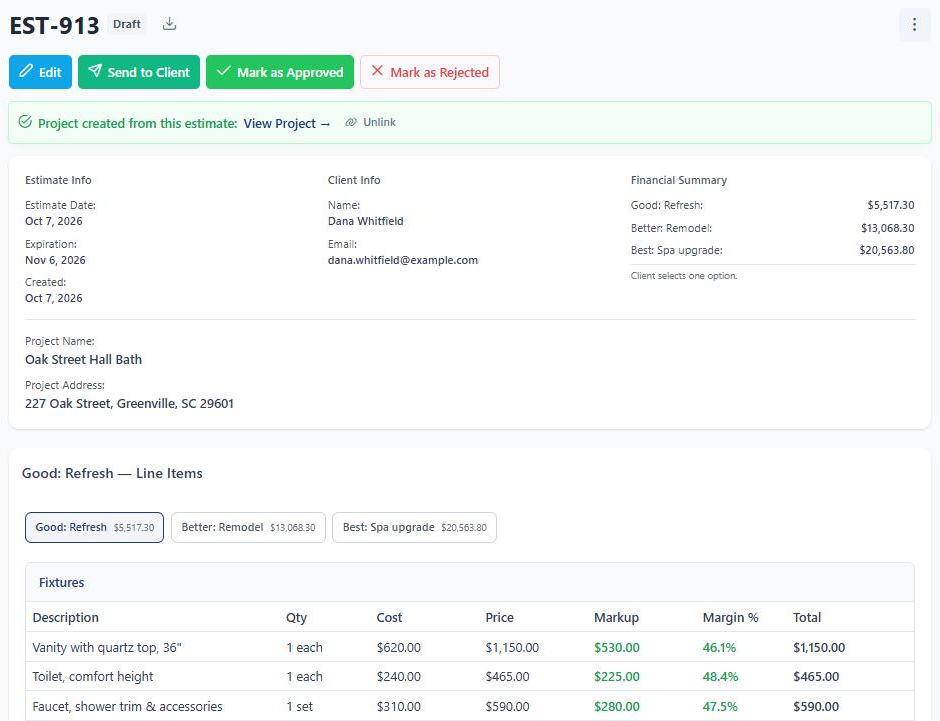
Send estimates that win the job.
Pull line items from your price list, add photos, and send it before you leave the driveway. Your client reviews, asks questions, signs, and pays the deposit from their phone.
- Good, better, best options. Let the client pick the package that fits their budget.
- Approve and e-sign on their phone, with a deposit (a percentage or a flat amount) collected up front.
- Questions answered on the estimate. A built-in chat keeps the back-and-forth in one place, and you can send it to more than one person.
- Chip, the AI assistant, drafts it for you. Turn on automatic follow-ups and quiet estimates get a friendly nudge.
Get paid without chasing checks.
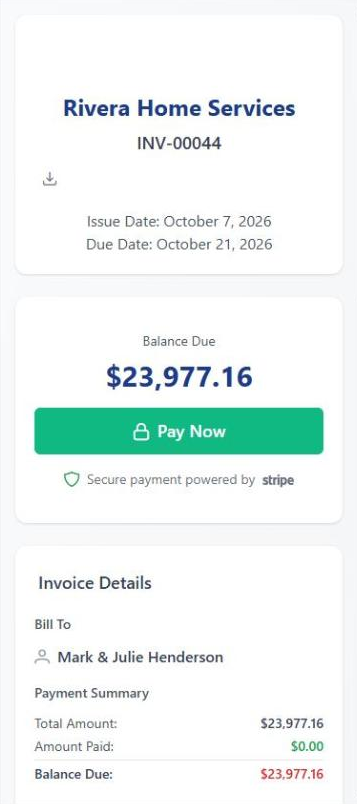
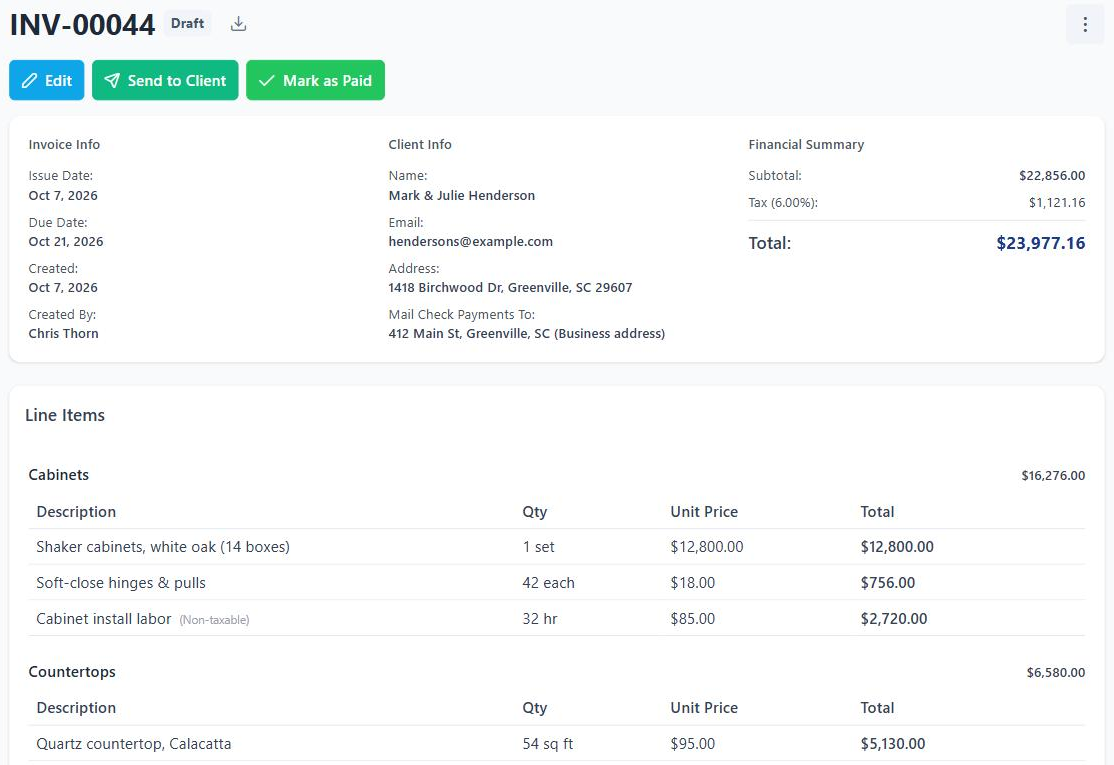
Turn an approved estimate into an invoice in one click. Your client pays online by card or bank transfer, and the money lands in your account through Stripe.
- Bill in stages. Progress invoices pull from the estimate, so a big job can be paid in parts.
- Before and after photos on the invoice, so the client sees exactly what they're paying for.
- Paid by check? Mark it paid with the real date. Optional reminders follow up on unpaid invoices, and Pro syncs everything to QuickBooks.
Your clients are going to love this.
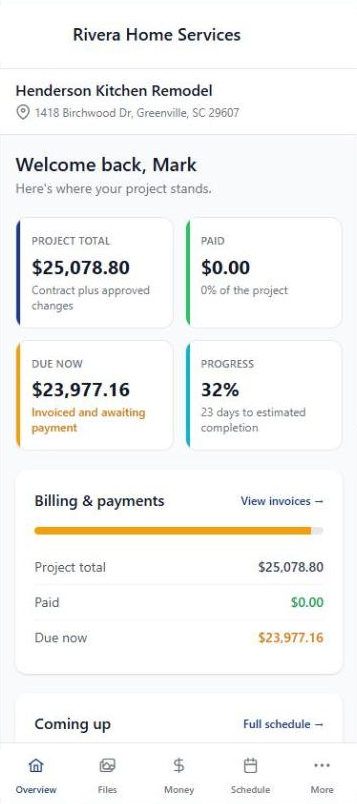
No accounts. No passwords. No "I forgot my login" texts at 9pm. Just a link that opens to everything about their job: photos, documents, the schedule, estimates, invoices, change orders, contracts, and messages with you.
- One link, no signup. They click and they're in, on their phone, tablet, or laptop.
- Approve estimates and pay invoices with a single tap.
- You decide what they see. Share progress photos and docs on your terms.
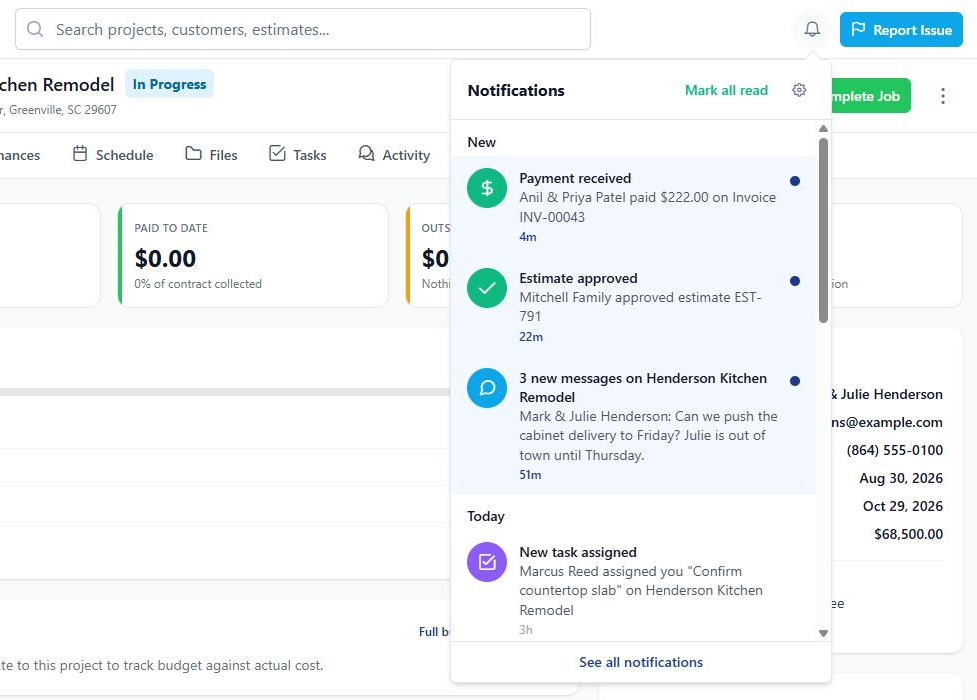
Know the moment a client says yes.
A notification bell sits on every screen, and the iPhone and Android apps push the important stuff straight to your pocket. No more refreshing your inbox between jobs.
- The right people hear about it. Payments, approvals, signatures, and job assignments go to whoever needs to know.
- No noise about your own clicks. Nobody gets pinged for something they just did.
- Everyone picks their own settings. Each person on your team chooses what comes by email and what comes by push.
Switching from Jobber or Housecall Pro?
Bring your customers, price book, jobs, invoices, estimates and recurring jobs with you, and undo the import if something looks off. You can do it all during your free trial.
- Jobber
- Housecall Pro
- JobNimbus
- Any CSV
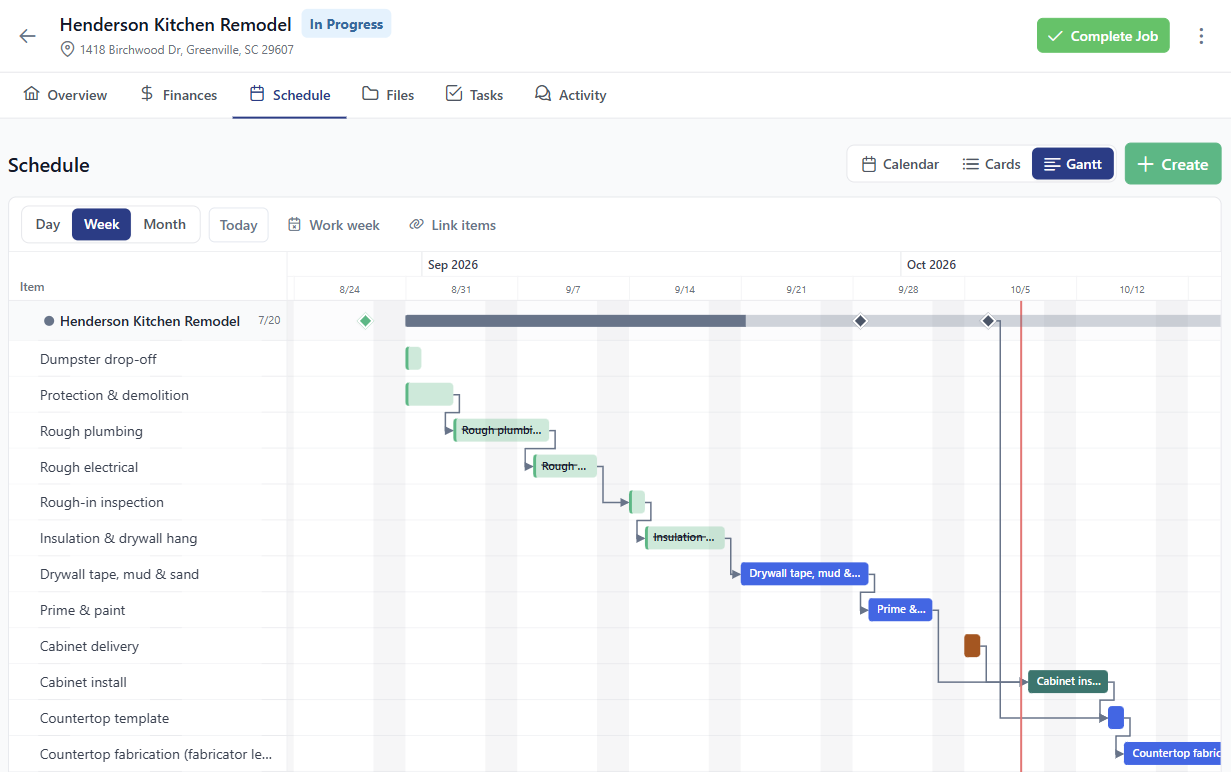
Bigger jobs and remodels, under control.
When a job runs for weeks, give it a project. Tasks, timeline, daily logs, photos, change orders, and the budget all live in one place.
- A Gantt timeline. Link steps together, and when one slips, the ones after it move too.
- Budget vs. actual. Track every expense against the estimate so you see the slip coming, not the surprise bill.
- Daily logs and task templates. Log the day from your phone, and drop your go-to punch list onto a new project in one click.
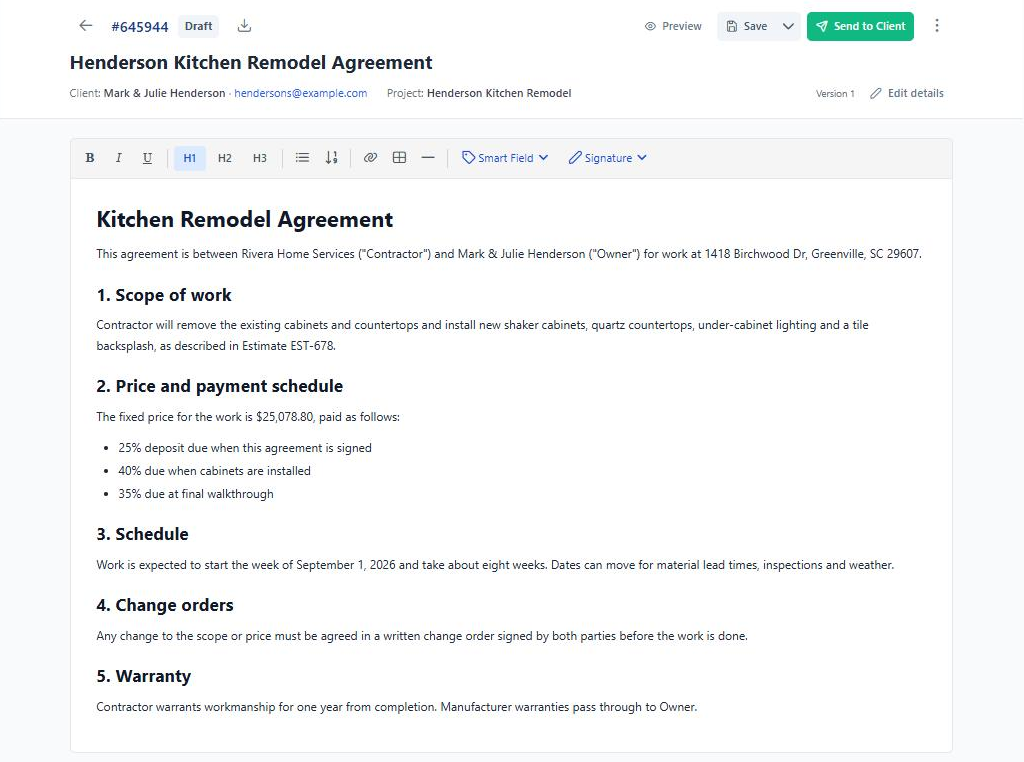
Draft, send, and sign, all in one tab.
AI helps you draft the first version in under a minute. Edit, send, and your client signs from their phone. You countersign, and the signed PDF lands in everyone's inbox.
- AI-drafted contracts from a 6-step wizard. Ready to edit in 60 seconds.
- E-signatures built right in. No DocuSign, no extra subscription.
- Reusable templates for the contracts you send most often.

A note from the founder
You're not just another customer.
I built BuilderBase because the existing tools felt like they were made for accountants, not the people actually doing the work. Bloated, expensive, and impossible to learn without a manual.
Got feedback? An idea? A bug? You'll hear back from me, usually the same day. Your input genuinely shapes what gets built next.
Don't just take our word for it
Loved by real pros.
Honest words from builders, contractors, and trades who use BuilderBase every day.
"I switched from spreadsheets and texting photos. My clients tell me the portal is the cleanest experience they've had with any contractor. Setting up a project takes minutes, not hours."
"The AI contract drafter saved me an hour per project. I emailed Chris with a feature request on a Tuesday. He replied the same day and shipped it the following week. That doesn't happen with the big guys."
"I run a painting crew. Three trucks, eight guys. I didn't think contractor software was for someone like me. BuilderBase is the first tool that didn't make me feel like I needed a manual. My clients love getting daily progress photos in the portal."
The little things add up
And so much more.
Here's what else lives inside BuilderBase. Every tool you need, none of the bloat.
CRM & Sales Pipeline
Track leads from first call to signed job on a drag-and-drop board. Each customer's estimates, invoices, and jobs sit on one profile.
Photos & Documents
Sort job photos and files into folders, and attach before and after shots to the invoice. Share what you want in the client's portal.
Contracts & E-Signatures
Clients sign estimates, change orders, and contracts on their phone. No DocuSign, no extra subscription.
Service Catalog
Save the line items you use on every job: labor rates, materials, common services. Build an estimate or invoice in minutes from your catalog.
Team Roles & Permissions
Choose what each person can see and do. Your crew can see their schedule without seeing your prices.
Reports & Expense Tracking
See what you earned and what each job made. Log expenses with receipts, and mileage is figured at the IRS rate for you.
Vendor Directory
Keep your subs and suppliers in one list with their insurance certificates and W-9s. You get a reminder before a COI expires.
Automatic Reminders
Turn them on once and BuilderBase nudges clients about open estimates, unpaid invoices, and tomorrow's visit. Polite, and never more than twice.
Change Orders
Client wants to add a room? Write up the extra work, they approve it online, and it carries through to the invoice.
Plays well with others
Built to fit into your stack.
Connect the tools you already use, and take BuilderBase with you on iPhone and Android.

Stripe
Card & bank payments
Live
QuickBooks
Accounting sync
Live
Google Calendar
Schedule sync
LiveApp Store
iPhone & iPad
DownloadGoogle Play
Android phones & tablets
Download
CompanyCam
Photo sync
Coming soonReady to ditch the spreadsheets?
Free 7-day trial. No credit card required. Cancel any time.