Know where every lead and customer stands.
Every lead and customer in one list, sorted by stage and by where they found you. Drag them across a pipeline as the job moves along. When someone calls back, their estimates, invoices and projects are one tap away.
Why this matters
The lead on the back of a business card. The voicemail you meant to return. Not anymore.
No more guessing where leads stand
Every customer has a stage. Filter the list by it, or see the whole pipeline on one board. You know who needs a follow-up.
No more "who is this again?"
Each customer has one page with their contact info, your private notes, and every estimate, invoice and project. Look before you call back.
No more "where did that lead come from?"
Mark every customer with how they found you. Referral, Google, Facebook, that yard sign. Filter by source and see what's bringing in work.
Stages that match how you sell.
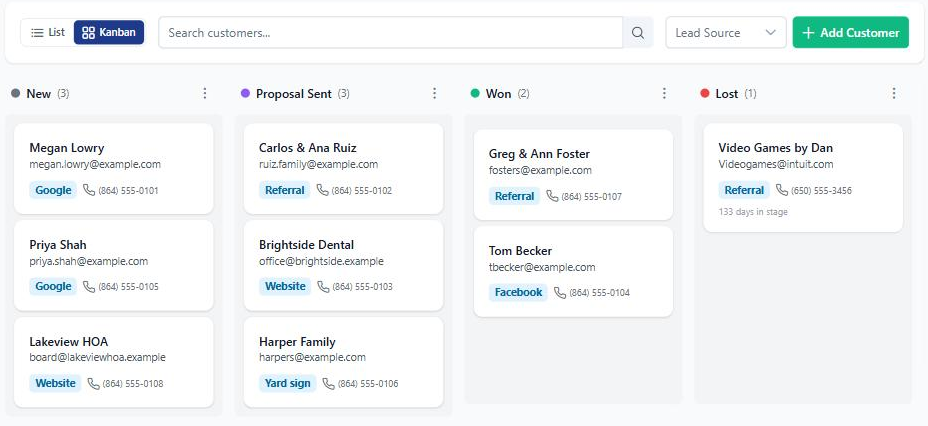
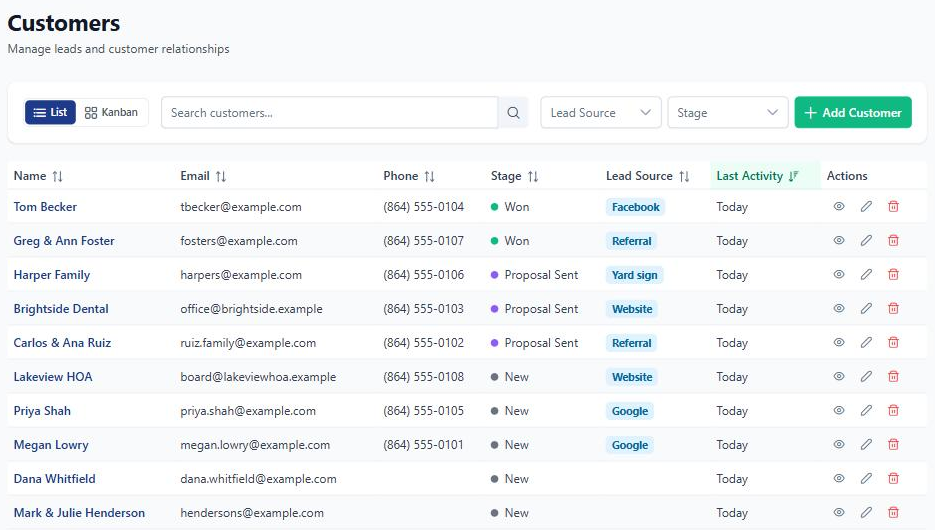
Search your customer list, then filter it by stage or lead source. On Pro, switch to the pipeline board and drag a customer from one stage to the next as the job moves along. The stages are yours to define.
- Your own stages. Rename the defaults, add new ones and put them in the order you work.
- Drag to move a customer along. The board is on Pro. The list, with its stage and source filters, is on every plan.
- Not everyone has to be in the pipeline. A customer can have no stage. Imported customers start that way, and a "No stage" filter finds them.
- Lead source on every customer. Pick from the list, or choose "Other" and type your own.
Every customer gets one page.
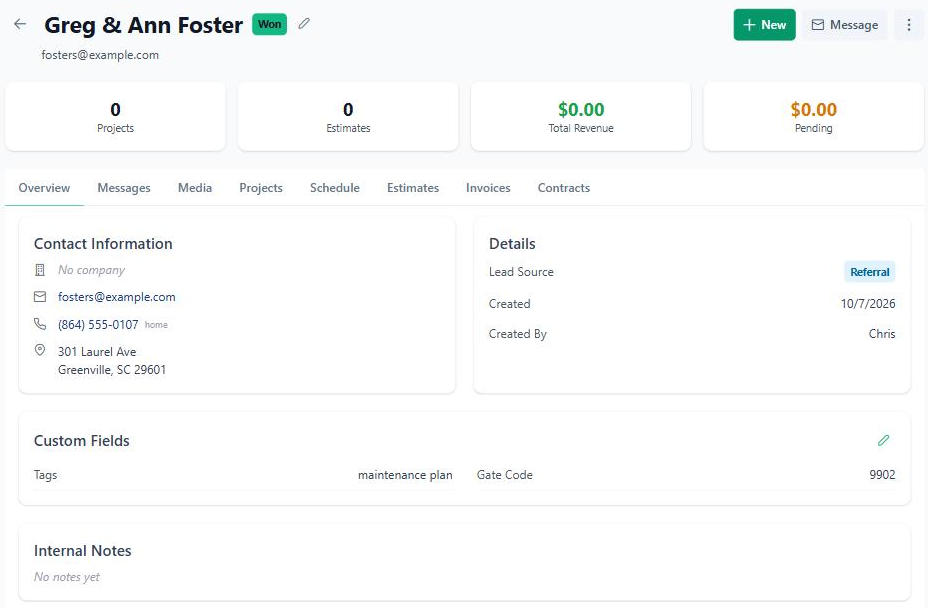
Phone numbers, address, lead source and your private notes sit at the top. Below are tabs for their messages, photos, projects, schedule, estimates, invoices and contracts. When a past customer calls about a new job, you can see everything you did for them.
- Start the next job from here. Tap "+ New" for an estimate or invoice with their details already filled in.
- The numbers up front. Projects, estimates, total revenue and what's still pending.
- Change the stage right on the page, or hit Message to reach them without leaving it.
- Internal notes stay internal. The gate code, the dog's name, the best time to call. Customers never see them.
Paperwork finds the right customer.
You don't have to file anything. When you create an estimate, invoice or project, BuilderBase links it to the customer it belongs to, so their page stays complete.
Matched by name and email
Type the client's name and email and it lands on the right customer. No email? Name and phone work too.
Fills in the blanks
If the customer was missing a phone or email and the new estimate has one, it's added to their page instead of making a duplicate.
One history per customer
Estimates, invoices, contracts and projects all show up on the customer's page. On Pro, invoices and estimates can also sync to QuickBooks.
Bring your customers with you.
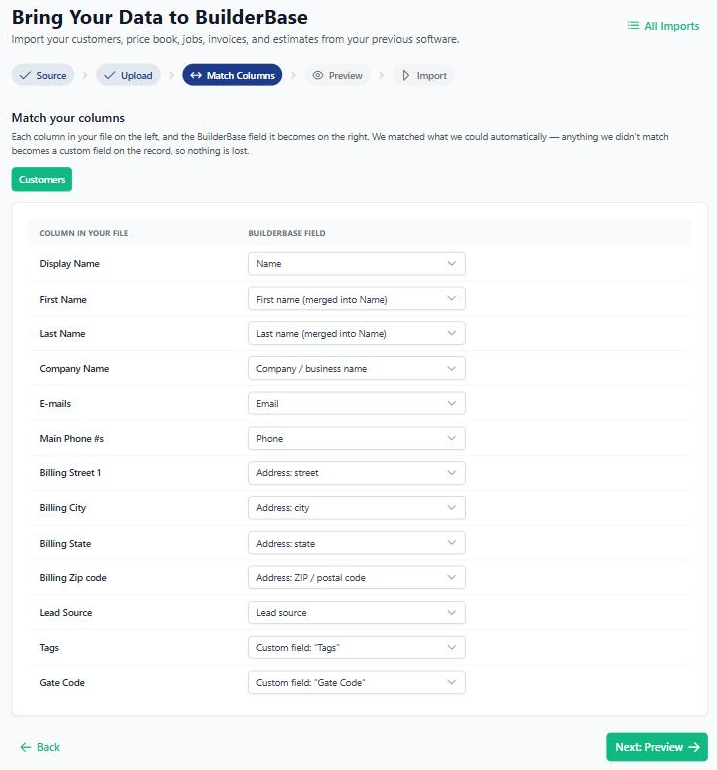
Coming from Jobber, Housecall Pro or JobNimbus, or keeping customers in a spreadsheet? Upload the export and match the columns. Anything that doesn't fit a standard field, like a gate code or tags, comes over as a custom field instead of getting dropped.
- Jobber, Housecall Pro, JobNimbus or any CSV. Columns are matched for you and you can change any of them.
- Custom fields you can edit. They show on the customer page, and you manage them in Settings.
- Your pipeline stays clean. Imported customers start with no stage, so a whole customer book doesn't land in "New".
"I tried Salesforce. I tried HubSpot. They're built for people whose job is selling. Mine isn't. BuilderBase is the first one I actually open. The pipeline shows me what I forgot to follow up on, then I close my phone and go back to work."
Stop losing leads. Start closing them.
Free 7-day trial. No credit card required. Cancel any time.