One link. Their whole job. On their phone.
Send your client a link. They tap it and see where the job stands: what's paid, what's due, what's next. They can approve, sign, pay and message you from the same screen. No account, no app download, no password to forget.
Why this matters
Fewer calls. Fewer texts. Faster payments.
No more "what's my password?"
There's nothing to sign up for and nothing to install. Your client taps the link on their phone, tablet or computer and they're in.
No more "when are you coming?"
Clients check the schedule, the photos and the progress themselves. Fewer status calls means more time on the job.
No more chasing approvals or checks
Clients approve, sign and pay from the same link. Stripe handles the money, and you get notified when it's done.
Send them a link. They're in.
Every project gets its own private link. Send it by text or email. Your client opens it, saves it to their home screen or bookmarks, and that's the whole setup.
- Unguessable link for each project. Only people you share it with can get in.
- Works on any device. Phone, tablet or computer. No app store, no install.
- Make a new link anytime to shut off the old one. Handy when a job wraps up.
One link per job
Same link for the whole project. Nothing new to send each time you add something.
Built for phones
Big buttons, easy reading. It works the way your clients already use their phone.
Your name on top
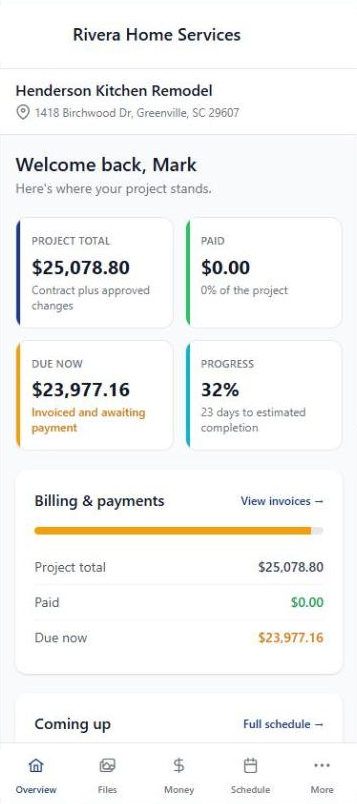
Your company name and logo sit at the top of the portal, so clients know it's from you.
Money at a glance
Project total, what's paid, what's due now and how far along the job is, right on the first screen.
Everything about the job, in one place.
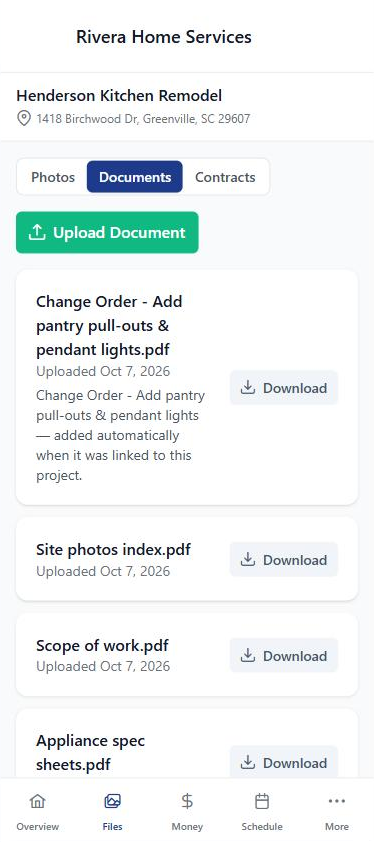
When's the crew coming? Where's the spec sheet? Did the change order go through? Your client can look it up instead of calling you.
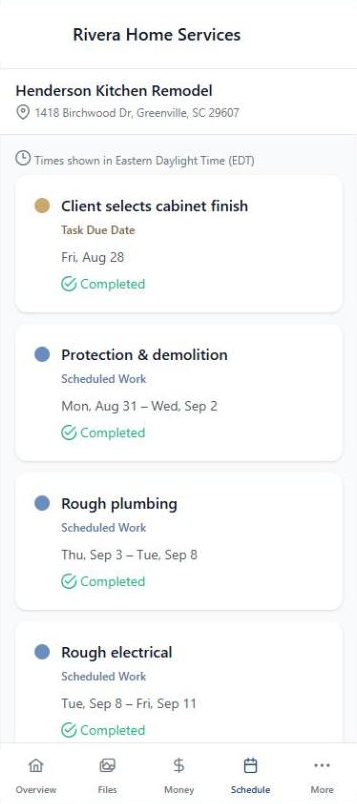
- The schedule you choose to share. Mark a visit client-visible and it shows up, with times labeled in your time zone and a Completed badge once it's done.
- Photos and documents you share, ready to view or download.
- Paperwork files itself. Estimate, invoice and change-order PDFs land in the project's Documents when they're linked, sent or approved. Drafts never show.
- Selections, too. Clients pick finishes and fixtures right in the portal.
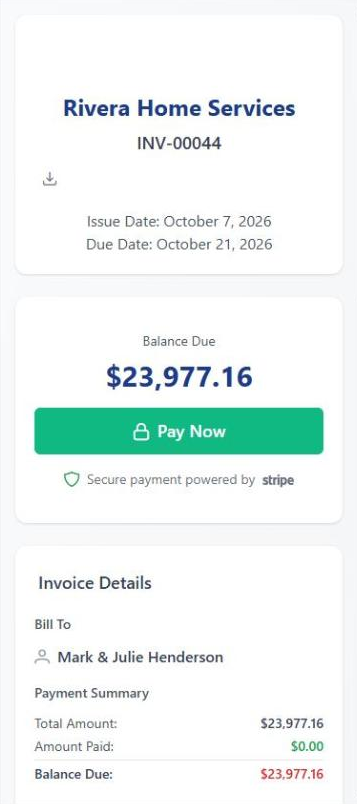
Approve. Sign. Pay. Done.
Estimates, change orders, contracts and invoices all live behind the same link. Your client reviews, signs and pays from their phone, and you get notified. No printing, no scanning, no waiting on a check.
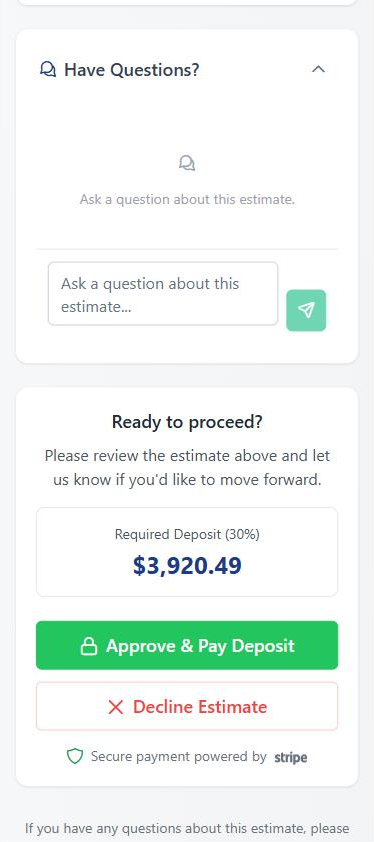
- Estimates: pick an option, ask you a question, approve, e-sign and pay the deposit in one go.
- Invoices: pay by card or bank transfer through Stripe, right from the invoice.
- Change orders and contracts: approve, sign and pay for extra work without a trip back to the office.
The bill comes with the proof.
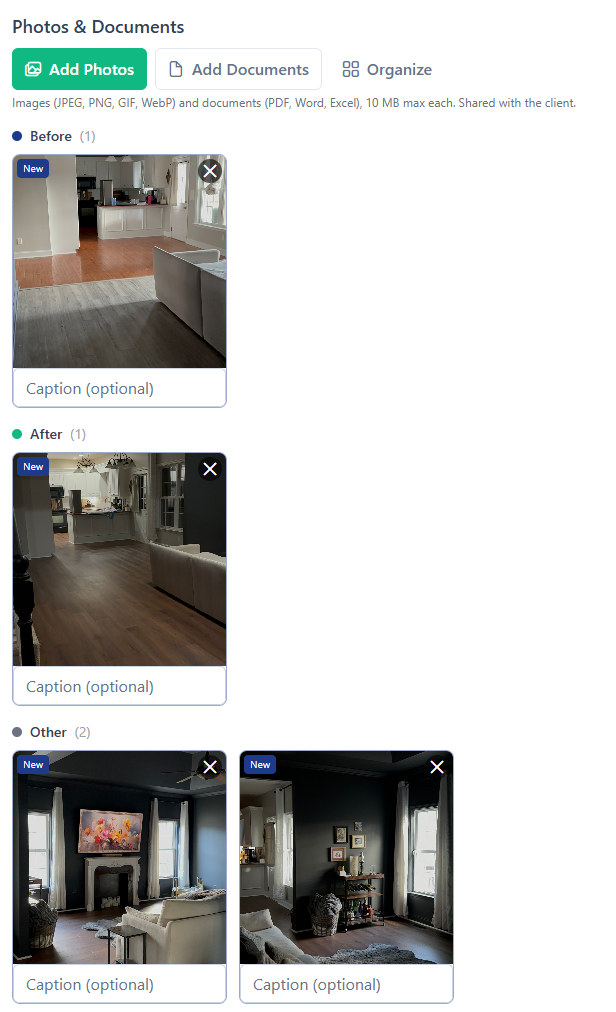
Attach before and after photos to an invoice and your client sees them in the portal, right next to the amount due. It's easier to pay for work you can see.
- Grouped Before, After and Other so the story is clear at a glance.
- Snap them from the job site with the BuilderBase app on your phone.
Conversations stay with the job.
Questions, photos and files from your client land on the project, not buried in your personal texts.
Message you from the portal
Your client sends a message from their link. You reply from the BuilderBase app. Email notifications keep both sides in the loop.
Clients can send you files
Inspiration photos, an HOA letter, a paint color they love. Clients upload photos and documents to the portal and you get notified.
Questions on the estimate
Clients ask their questions right on the estimate, so your answer sits next to the price instead of in a text thread.
They see the job. Not your books.
The portal shows what a client needs and nothing you'd rather keep in-house.
What your client sees
- Project total, paid, due now and progress
- Schedule items you mark client-visible
- Photos and documents you share
- Estimates, invoices, change orders, contracts and selections
- Messages with you
What stays private
- Internal notes
- Your costs and margins
- Vendor and subcontractor names
- Draft estimates, invoices and change orders
- Schedule items you don't mark client-visible
The project portal is part of the Pro plan. On every plan, including Starter, each estimate, invoice and contract you send still gets its own link your client can open, sign and pay from.
"I switched from spreadsheets and texting photos. My clients tell me the portal is the cleanest experience they've had with any contractor. Setting up a project takes minutes, not hours."
Built for your work
See how BuilderBase fits the way you sell and run jobs.
Give your clients a portal worth bookmarking.
Free 7-day trial. No credit card required. Cancel any time.