Week of August 21, 2026
Build your own roles and decide exactly what each person can see, send an estimate to more than one person, attach photos to invoices and change orders, and let BuilderBase file your paperwork under the project for you.
The biggest week for access control since launch. You can now build your own roles instead of picking from three, and decide down to the individual action what each person on your team can see and do.
Build your own roles
Until now everyone was an Admin, a Team Member or a Worker. Those three still exist and behave exactly as they did, but you are no longer limited to them.
- Create a role, name it, and tick the permissions it should have. View, create, edit, delete and send are separate switches on every area of the app
- Financial Visibility is a single master switch. Turn it off and pricing disappears from that person’s view: contract values, job payment amounts, customer revenue and your cost catalog prices. This is what makes a subcontractor role possible, with access to the work but none of your numbers
- Only assigned scoping on schedule and projects, so a crew lead sees the jobs they are on and nothing else
- Change a role and it applies on that person’s next page load. No logging out
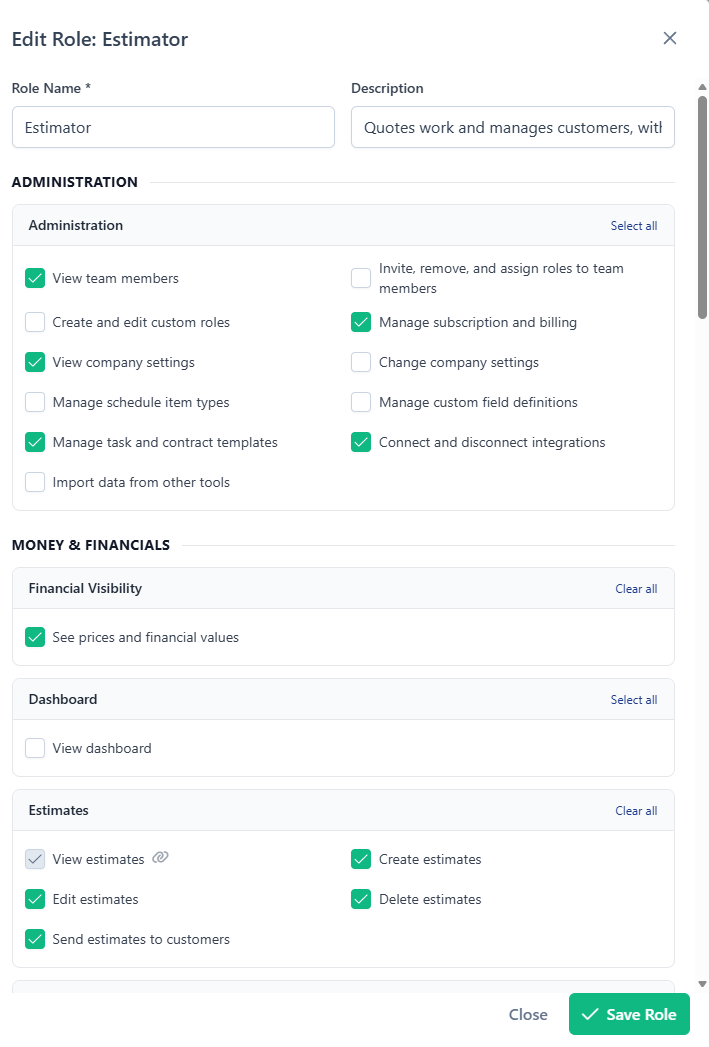
The role builder warns you when a role has, say, invoices ticked but financial visibility turned off, because that combination still shows amounts. One click fixes it.
Custom roles are on the Pro plan. The three built-in roles are on every plan, and nothing about your existing team changed when this shipped. There is a guided walkthrough in the setup checklist if you want a tour.
Estimates: more than one recipient, and fewer lost emails
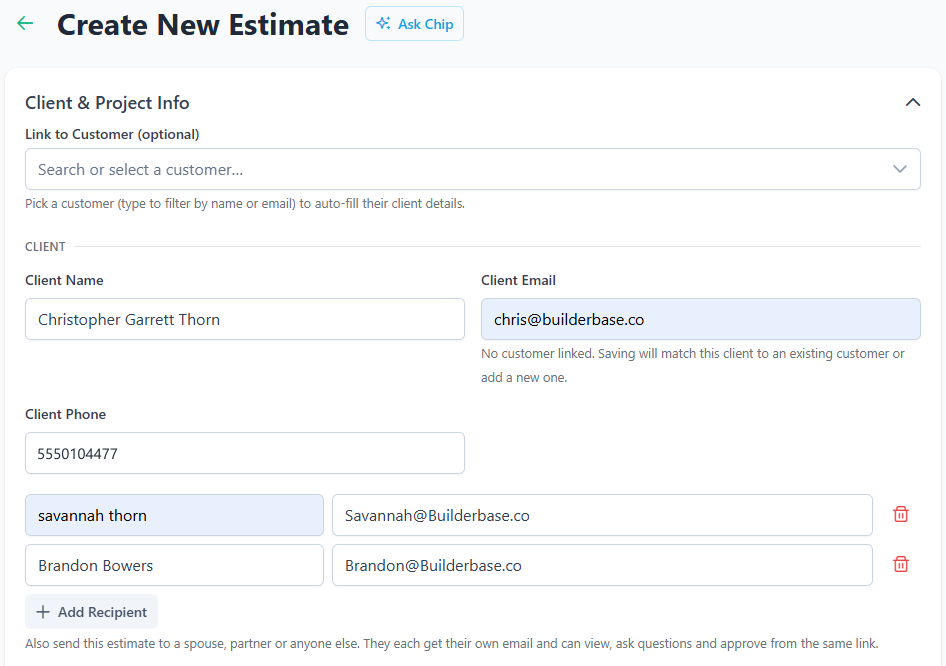
Plenty of jobs have two decision makers. An estimate can now go to both.
- Add extra recipients to an estimate and they each get their own copy
- One shared portal link, so questions and answers stay in a single conversation with each message attributed to whoever asked
- Each recipient is sent independently, so one bad address does not hold up the rest
Email addresses got safer at the same time:
- A client email is now optional to save, so you can start an estimate, invoice or project before you have one. You still need one to send
- Obvious typos are caught as you type
- If an estimate or invoice email bounces, or a mailbox rejects it, the person who pressed Send gets an email and a push notification. Silent failures were the worst kind
Photos and documents on invoices and change orders
Estimates have carried attachments for a while. Invoices and change orders now do too, and clients see them on the portal.
- Invoices group photos into Before, After and Other
- Add a batch of photos, sort them into their groups in one pass, and use Organize later if something landed in the wrong place
- Attach documents as well as photos, on both invoices and change orders
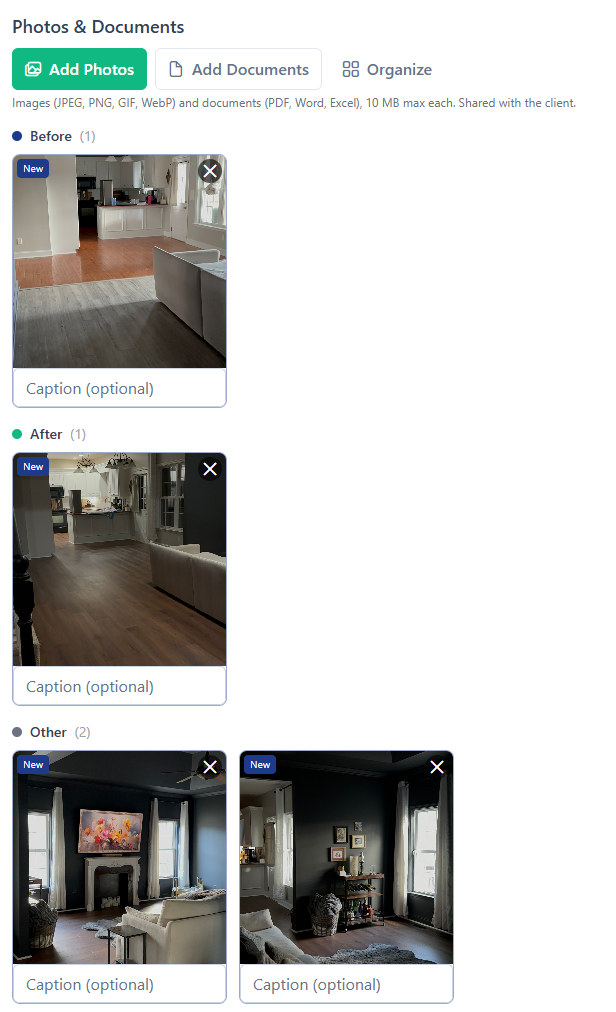
Anything you attach to an invoice is visible to the client, so treat it as part of the invoice rather than internal notes.
Your paperwork files itself under the project
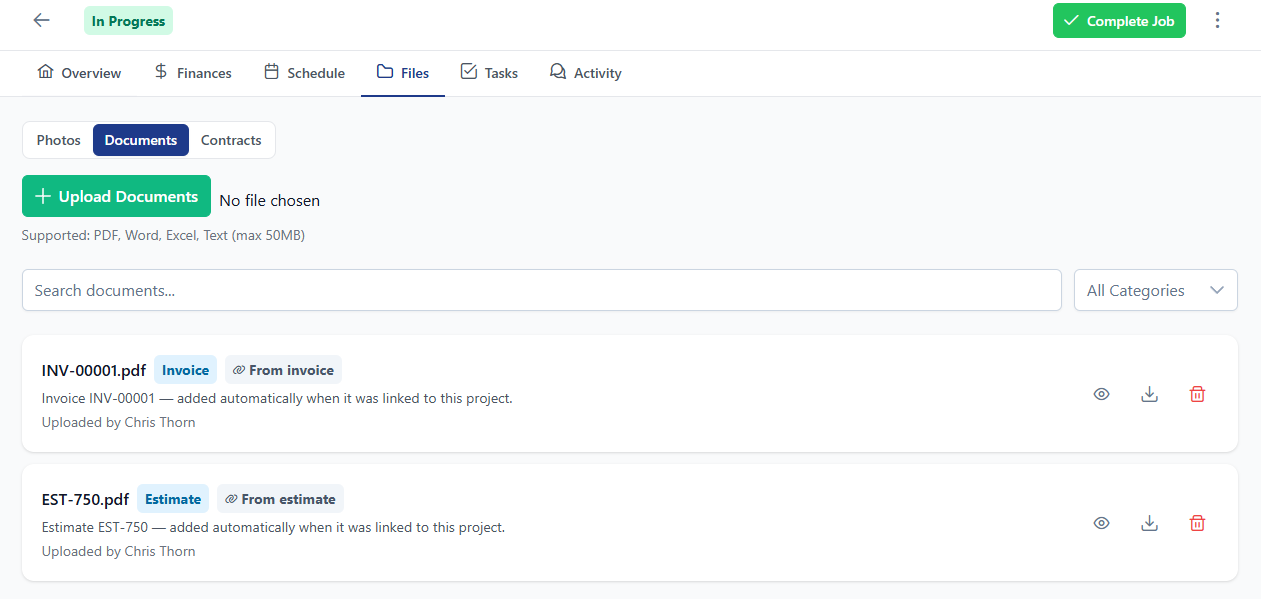
Link an estimate to a project and BuilderBase now files the client-facing PDF of that estimate, plus every invoice and change order attached to it, under the project’s Files tab. Invoices and change orders file themselves when you send or approve them, too.
- Drafts stay out, since project documents are client-visible
- Unlink the estimate and the filed copies come back out
- Files you uploaded by hand are never touched
- Preview a PDF in the app instead of downloading it first, on both the project and the client portal
Also shipped this week
- BuilderBase is on Google Play. Both app stores are live, and visitors on a phone now get an install prompt for the right one
- Schedule assignments come through as push notifications, and tapping one opens that event. There is a company-wide switch in Settings if you want the push without the email
- Pages stop loading data a role cannot see, which was causing spurious “failed to load” errors for restricted users
- Customer matching fills in the blanks. If a customer record is missing a phone or email and a new estimate has one, it gets added instead of creating a second copy of that customer
- A refreshed vendor interface, and fixes to editing an estimate after it has been created
Want these updates in your projects?
Start a free trial and put the latest BuilderBase features to work today.